Emergency courier communication is defined as the structured, automated process by which couriers transmit real-time delivery status updates to clients, dispatchers, and recipients throughout a time-critical consignment's journey. The industry term for this is event-driven notification architecture, and understanding how it works is the difference between a logistics operation that runs on trust and one that runs on complaints. How emergency couriers communicate updates has shifted decisively from manual phone calls and ad hoc texts to integrated workflows combining GPS fleet tracking, Transport Management Systems (TMS), and automated milestone alerts. Platforms like Spytec GPS and systems analysed by US Tech Automations demonstrate that system integration, not communication effort, determines whether clients receive accurate updates or conflicting ones.
How do emergency couriers communicate real-time updates?
The technical foundation of emergency courier communication rests on three interconnected layers: GPS tracking, communication protocols, and TMS integration. Each layer feeds data into the next, creating a single, reconciled picture of where a consignment is and when it will arrive.

GPS fleet tracking is the starting point. Tools like Spytec GPS calculate dynamic ETAs using live location data and traffic conditions rather than static, schedule-based estimates. This means a client's estimated arrival window updates automatically as road conditions change, without a dispatcher lifting the phone.
The communication protocols that carry these updates to clients and drivers differ by purpose. Server-Sent Events are ideal for one-way customer-facing push notifications, such as "Your delivery is 10 minutes away." WebSockets, by contrast, support two-way communication between drivers and dispatchers, enabling real-time dialogue when a delivery exception occurs. Using the right protocol for the right channel reduces latency and avoids message duplication.
The third layer is integration. Combining TMS, carrier APIs, route planners, and driver apps into one orchestrated workflow creates a single source of truth. When all systems read from the same data, conflicting status messages become structurally impossible. You can read more about how courier routing technology supports this kind of integration in practice.
Key communication tools used by emergency couriers include:
- GPS fleet tracking platforms (e.g., Spytec GPS) for live location and ETA recalculation
- Driver mobile apps connected to TMS for status confirmation at each milestone
- Automated SMS and email gateways for client-facing milestone notifications
- WebSocket-based dispatcher consoles for two-way driver communication
- Self-service tracking portals that reduce inbound status enquiries
Pro Tip: Set your GPS polling interval to no longer than 60 seconds for emergency deliveries. Longer intervals create ETA drift that compounds into significant inaccuracies over a two-hour journey.
How does automation reduce dispatcher workload and improve update accuracy?
Manual update processes are the single largest source of communication errors in emergency courier operations. When a dispatcher must check a driver app, cross-reference a TMS, and then manually send a client update, the opportunity for error at each step is substantial.
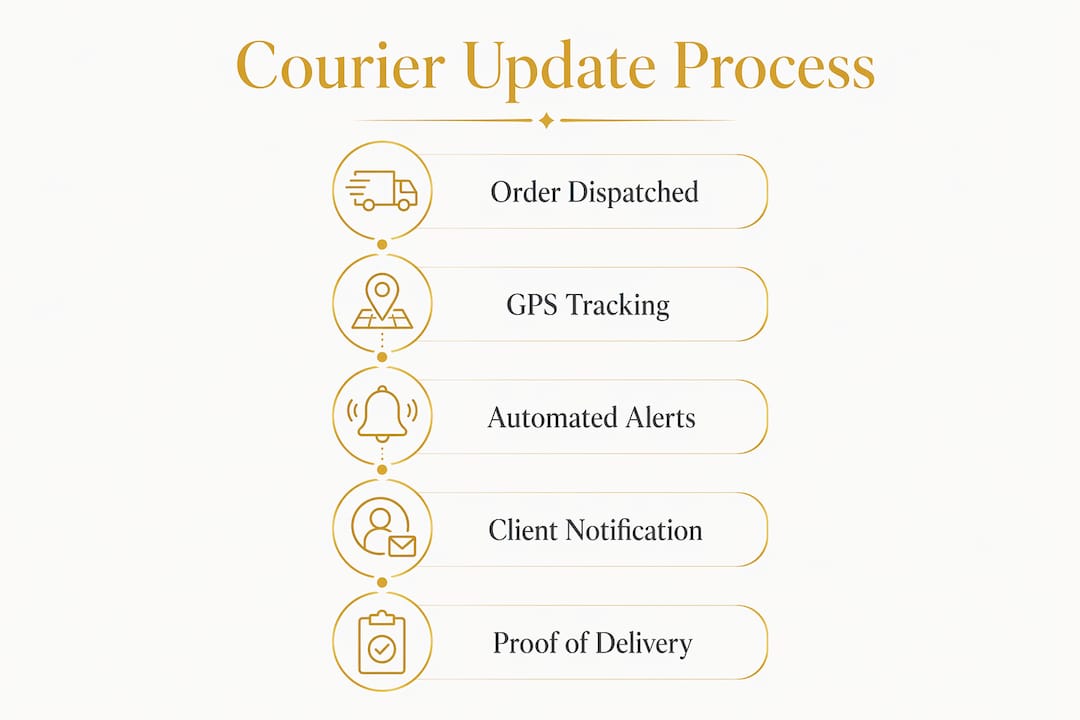
Automated workflows replace this chain with event-triggered alerts. The system fires a notification only when a confirmed status change occurs, such as "dispatched," "out for delivery," "delivered," or "exception." Milestone notifications on confirmed status changes improve both accuracy and client satisfaction because the message reflects reality rather than a dispatcher's best guess.
The operational savings are measurable. Automated communications reduce dispatcher workload by 15 to 25 hours per week on a 15-vehicle fleet. That is the equivalent of recovering half a full-time role per week, which can be redirected to exception handling and client relationship management.
AI-powered systems take this further. Platforms that combine Route4Me, Onfleet, and Track-POD data automate personalised status messages and further reduce staff workload by eliminating the need for manual message composition at each milestone.
The table below maps common delivery milestones to their recommended notification channels and message types:
| Milestone | Recommended channel | Message type |
|---|---|---|
| Order confirmed and dispatched | SMS + email | Confirmation with driver name and ETA |
| Out for delivery (within 30 minutes) | SMS | Live ETA with tracking link |
| Delivered successfully | SMS + email | Confirmation with proof of delivery link |
| Delivery exception or delay | SMS + email + dispatcher alert | Honest update with revised ETA |
| Failed delivery attempt | Email + dispatcher escalation | Reason, next steps, rescheduling options |
Pro Tip: Map each milestone to a specific channel preference agreed with the client at onboarding. A medical client may require phone confirmation for failed deliveries; a retail client may be satisfied with email alone.
What are the common pitfalls in emergency courier communication?
The most frequent cause of communication failure is not a lack of effort. Systems-integration failure is the primary driver of inaccurate or missing updates in last-mile logistics. When a TMS, a driver app, and a carrier API each hold slightly different status data, the notification system has no reliable source to draw from.
Three specific failure patterns account for the majority of complaints:
- Disconnected systems producing conflicting updates. A client receives a "delivered" notification from one system while the TMS still shows "in transit." This destroys trust faster than a late delivery.
- Schedule-based triggers firing regardless of actual events. A notification sent at a fixed time interval, rather than on a confirmed status change, frequently misrepresents the delivery's real position. The role of technology in courier services makes clear that schedule-based systems are a legacy approach that modern operations should replace.
- Silent failures during exceptions. When a delivery is delayed or a first attempt fails, many systems simply stop sending updates. The client hears nothing, assumes the worst, and calls the dispatcher. This is the scenario that erodes client relationships most severely.
The fix for all three patterns follows the same principle. Mapping events to confirmed milestone changes and building automated exception paths ensures that every status change, including failures and delays, triggers a defined communication response. No event should be allowed to pass without a corresponding client notification.
How to implement reliable courier update communication workflows
Implementing a dependable update system requires connecting the right tools, defining clear notification rules, and building feedback loops that confirm delivery at every stage.
-
Integrate all data sources into one workflow. Connect your TMS, carrier APIs, route planning software, and driver app so that status data flows into a single reconciled system. Webhooks are the preferred method. Notification latency under five minutes is achievable when webhooks replace polling-based integrations.
-
Define milestone notification templates. Write specific message templates for each confirmed milestone. Include the driver's name, the updated ETA, and a self-service tracking link. Templates eliminate inconsistency and reduce the time required to send each update.
-
Set channel preferences per client. Some clients require SMS for urgent updates and email for records. Others use a logistics portal. Capture these preferences at onboarding and configure your notification system accordingly.
-
Build an automated exception path. When a delay or failed delivery is detected, the system should automatically send a client notification with a revised ETA and simultaneously route an alert to the dispatcher for rapid resolution. This is not optional for emergency deliveries.
-
Implement digital proof of delivery. GPS-enabled digital proof of delivery, including photos, signatures, and geotags, reduces dispute losses by 60 to 80%. Attach proof automatically to the delivery confirmation notification so clients receive it without needing to request it.
The comparison below shows the operational difference between a manual and an automated communication workflow:
| Factor | Manual workflow | Automated workflow |
|---|---|---|
| Update trigger | Dispatcher judgement | Confirmed system event |
| Average notification latency | 15 to 45 minutes | Under 5 minutes |
| Dispatcher time per week (15 vehicles) | 25 to 40 hours | 10 to 15 hours |
| Exception handling | Reactive, client-initiated | Proactive, system-initiated |
| Proof of delivery | Manual attachment | Automatic with confirmation |
For context on how urgent delivery failures are managed within these workflows, the principles of rapid exception routing apply directly.
Why do proactive exception notifications matter for emergency deliveries?
Proactive exception communication is the single most effective way to maintain client trust when a delivery does not go to plan. The instinct to wait until a problem is resolved before communicating is understandable, but it is operationally counterproductive.
Proactive delay alerts decrease complaint escalations by 40 to 60%, according to the FreightWaves 2025 Carrier Experience Report. This means that a client who receives an honest, timely update about a delay is significantly less likely to escalate than one who receives nothing. The update itself, not the absence of a problem, is what preserves the relationship.
The mechanics of effective exception communication involve three steps:
- Detection. The system identifies a deviation from the planned route or schedule using GPS and traffic data.
- Client notification. An automated message is sent immediately with an honest explanation and a revised ETA. The message should be specific, not vague.
- Dispatcher escalation. Simultaneously, the dispatcher receives an alert to assess whether intervention is needed, such as rerouting or deploying a second vehicle.
"Clients do not expect perfection. They expect transparency. An honest update sent within two minutes of a delay being detected is worth more to the client relationship than a flawless delivery that was never communicated."
Integrating exception notifications consistently across both SMS and email channels, rather than relying on a single channel, reduces the risk that a critical update goes unseen. For mission-critical deliveries, this dual-channel approach is standard practice.
Key takeaways
Effective emergency courier communication depends on event-driven, integrated workflows that trigger accurate notifications on confirmed status changes, not on manual effort or schedule-based alerts.
| Point | Details |
|---|---|
| Integration is the foundation | Connect TMS, carrier APIs, route planners, and driver apps into one reconciled data source. |
| Event-driven triggers outperform schedules | Fire notifications only on confirmed milestone changes to avoid false or premature alerts. |
| Automation recovers significant time | Automated workflows save 15 to 25 hours of dispatcher time per week on a 15-vehicle fleet. |
| Exception communication protects relationships | Proactive delay alerts reduce complaint escalations by 40 to 60% across emergency deliveries. |
| Digital proof of delivery reduces disputes | GPS-enabled proof of delivery cuts dispute losses by 60 to 80% when attached automatically. |
What I have learned about getting courier communication right
After working closely with logistics operations of varying sizes, the pattern I see most often is this: businesses invest in good courier partners but underinvest in the communication layer that connects those partners to their clients. The result is a technically competent delivery operation that generates unnecessary complaints because clients are left guessing.
The single most impactful change any logistics manager can make is to replace schedule-based notification triggers with event-driven ones. It sounds like a technical detail, but the operational effect is profound. Clients stop calling to ask where their consignment is. Dispatchers stop spending their mornings answering status enquiries. The entire operation becomes measurably calmer.
I have also seen businesses underestimate the value of digital proof of delivery as a communication tool. It is not just a dispute resolution mechanism. When a client receives a delivery confirmation that includes a timestamped photo and a geotagged signature within seconds of the drop, it signals a level of operational discipline that builds long-term trust. That trust is what converts a one-off emergency delivery into a recurring contract.
My practical advice: audit your current notification workflow by asking one question. Does every notification fire because something actually happened, or because a timer ran out? If the answer is the latter for any milestone, fix that first. Everything else is secondary.
— Ayomide
How Sddbyaba keeps you informed on every emergency delivery
Sddbyaba operates emergency courier services across the UK with a communication model built on the principles described in this article. Every consignment handled by our dedicated vehicles triggers automated SMS and email notifications at confirmed milestones, from dispatch through to proof of delivery. Our fleet tracking integration means clients receive live ETA updates without needing to call the office.

Whether you need a motorcycle courier for an urgent document or a 7.5-tonne truck for time-critical freight, our nationwide dispatch services are available 24 hours a day. We connect our drivers, route planners, and dispatch team into one workflow so that you always have an accurate, up-to-date picture of your delivery. Contact Sddbyaba today to discuss how our communication-first approach can support your logistics operation.
FAQ
How do emergency couriers send real-time delivery updates?
Emergency couriers use GPS tracking integrated with TMS and driver apps to trigger automated SMS and email notifications at confirmed milestones such as dispatch, out-for-delivery, and delivered. Webhooks reduce notification latency to under five minutes, ensuring clients receive accurate updates without manual intervention.
What is the difference between SMS and email notifications for courier updates?
SMS is best for time-sensitive alerts requiring immediate attention, such as live ETA updates and exception notifications. Email is suited to milestone confirmations and proof-of-delivery records that clients need for documentation purposes.
Why do some courier update notifications contain incorrect information?
Inaccurate notifications are caused primarily by systems-integration failure, where TMS, driver apps, and carrier APIs hold conflicting status data. The fix is to reconcile all data sources into a single workflow and trigger notifications only on confirmed status changes.
How does digital proof of delivery support communication?
Digital proof of delivery, including GPS-tagged photos and electronic signatures, is attached automatically to the delivery confirmation notification. This eliminates the need for clients to request evidence and reduces delivery disputes by 60 to 80%.
What should logistics managers look for in a courier notification system?
Logistics managers should prioritise event-driven triggers, multi-channel delivery (SMS and email), automated exception routing, and integration with existing TMS and fleet tracking platforms. Schedule-based systems that fire at fixed intervals regardless of actual delivery status are a significant operational risk for emergency consignments.